What Is Tor?
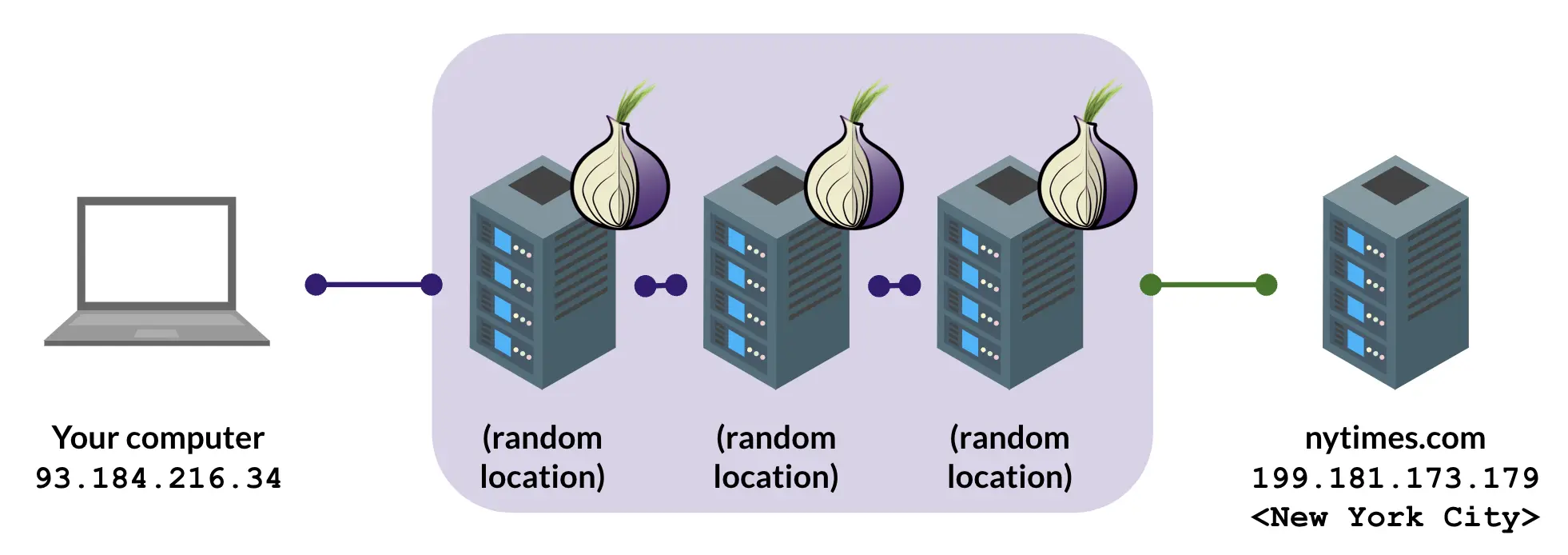
Tor (The Onion Router) is a volunteer-operated open source network that anonymizes connections through layered encryption and randomized paths. The problem it solves is concrete: connecting to a website normally hands your IP address, browser fingerprint, and connection timing to that site and to every observer along the way. Tor splits the chain into three segments, so that no single point knows both who you are and what you are connecting to.
The difference from a VPN gets muddled often enough to be worth stating plainly. A VPN concentrates your traffic at one trusted provider. You trust that provider not to log and not to hand data over, and the provider is a single point. Tor distributes the trust: no node sees the full path, so anonymity does not require trusting any one of them. For the fuller comparison and how to choose, read what is an anonymity network and how to build a threat model. For the specific risks of a VPN, how to pick one worth trusting, and when a VPN suffices without reaching for Tor, see VPN: risks and how to choose.
How onion routing works
For each request, the Tor client picks a random path through three nodes. The data is encrypted in the innermost layer first, then the middle, then the outer. Each node it passes peels off one layer, like an onion, and only at the exit node does the original connection become visible.
The design point is that each node only sees one hop in each direction:
- The guard relay knows your real IP address and sees only that you want to reach the next Tor node. It does not know your final destination.
- The middle relay knows nothing. Tor nodes sit on both sides of it, and it cannot even see your IP address.
- The exit relay sees the site you are reaching, and the source IP it sees is the middle relay, not you.
Identifying you requires putting all three segments together, which means controlling the guard and the exit at the same time and running timing analysis. The Tor network has more than 8,000 nodes spread across countries and operators, including universities, non-profits, hosting companies, and individual volunteers. The cost of that attack is itself where Tor's security comes from. Current node counts are on Tor Metrics.

Relays and bridges
Tor nodes come in two kinds: public relays and unlisted bridges.
The relay list is public, and that is deliberate. Anyone can verify which nodes are on the network, who runs them, and for how long. Being publicly auditable is a layer of trust that a private anonymity network, such as a commercial VPN, does not offer.
A public list is also a blocking target. In heavily censored environments, local ISPs block the IP addresses of all public Tor relays outright. For people in those places, the community designed bridges: nodes whose addresses are not published, distributed through the official website, email, and messaging channels to people who need them.
Bridges combine with pluggable transports to disguise the traffic itself:
- obfs4 makes Tor traffic look like random noise, defeating direct signature matching by deep packet inspection
- meek wraps traffic to look like a connection to a large cloud service such as Microsoft Azure. Google and Cloudflare were used in earlier years before domain fronting was shut down. The censor's choice becomes blocking everything or allowing it
- Snowflake wraps traffic as WebRTC, the protocol video calls use, with volunteers' browser tabs around the world serving as temporary bridges
What this looks like across the region
- Mainland China: public relays are blocked, so a direct connection generally fails. Bridges with obfs4, Snowflake, or WebTunnel are the working configurations, and which one works shifts over time as detection changes
- Taiwan: no bridge needed, since public relays connect directly. Opening a Snowflake browser tab to serve as a bridge for people in censored regions is the lowest-effort contribution to networked freedom available
- Hong Kong: connections are technically unfiltered and running Snowflake is feasible, though anyone considering it should weigh the national security monitoring environment first. The Hong Kong section of Tor Snowflake covers this
- Singapore and Malaysia: Tor is reachable, and the questions that matter are about what is linked to a verified identity rather than about whether the connection works
What Tor is good for, and what it is not
Tor is not a general-purpose anonymity switch. Used in the wrong situation, it costs performance without delivering the protection you assumed. Align expectations against how to build a threat model first.
Good for:
- Reading and researching sensitive subjects (health, sexuality, politics, financial trouble) without the browsing being collected by ad networks or your ISP
- Cross-border access and getting around regional blocking, including geo-restricted content
- First contact with journalists, whistleblowers, or cross-border collaborators, alongside onion services or OnionShare
- A single task that needs to be cut off from you completely, which works best combined with Tails
Not good for:
- Logging into services already bound to your identity (online banking, your main email, government services). Tor does not make you more anonymous there, and it may trigger fraud controls and additional verification
- Financial services requiring a local IP address, which many banks and government services enforce
- High-bandwidth real-time applications (4K video, gaming, video calls). Layered encryption over multiple hops makes the latency obvious
- Peer-to-peer file sharing such as BitTorrent. Exit bandwidth is limited, this traffic damages capacity for everyone else, and it readily exposes your real IP anyway
- The expectation that routing everything through Tor makes everything safer. Tor addresses anonymity at the connection layer, which is a different problem from browser fingerprinting, logged-in identity, and file metadata
Common questions
Is Tor or a VPN more anonymous?
Tor. A VPN concentrates trust in one provider: a claim not to log is not the same as an inability to log, and the provider is exposed the moment it receives a legal demand. Tor distributes trust across three independent nodes, where no single party knows both your real IP address and your destination, so no party has to be assumed honest. A VPN's advantages are speed and compatibility, including geo-unblocking and streaming. Tor's advantage is that it is structurally trust-free.
Can't the exit node see my traffic in the clear?
Yes, which is why Tor has to be used with HTTPS. The exit node sees the destination site and any unencrypted content, and does not see your real IP address. With HTTPS, the exit node sees only that someone connected to example.com, not what was transferred. Tor Browser ships HTTPS-Only mode and warns on sites without it.
Is it safe to use Tor for my email account?
Technically fine, and worth thinking through. Logging into an existing account means the provider sees that account arriving from a Tor exit node, which may trigger fraud controls and additional verification. The connection is secure, and the provider already knows who you are. For anonymous mail, consider Proton Mail's onion site or Tuta, with a separate account registered over Tor from the start.
Can my ISP see that I am using Tor?
Without a bridge, yes. Your ISP sees your IP address connecting to the IP address of a public Tor guard node, which is on a public list, so it knows you are using Tor while not seeing what you reach afterwards. That technical visibility is the same everywhere. Whether being seen using Tor has consequences depends on where you are. In Taiwan, Tor is lawful and carries no practical pressure. In Hong Kong, monitoring and chilling effects rose after the 2020 National Security Law, and while using Tor is not unlawful, journalists and activists observed doing so may attract additional attention. Work it through with how to build a threat model and the Hong Kong section of VPN: risks and how to choose. If that layer of exposure matters to you, a bridge with pluggable transports hides it.
Why is Tor so slow?
Three layers of encryption, three hops, and limited exit bandwidth are structural and will not improve dramatically. Two adjustments help the experience: switch the exit region in Tor Browser's settings to avoid congested countries, and avoid high-bandwidth content, since streaming in 8K is not what Tor is designed for. Bandwidth in Taiwan is plentiful, which is part of why the community works on getting Tor relays onto campuses, so local capacity becomes part of the global network.
Has Tor ever been broken?
Nothing is absolutely secure. Known attack surfaces include timing correlation by an adversary controlling both guard and exit (studied academically, requiring very large scale), browser fingerprinting (hardened in Tor Browser, not eliminated), and user error, where logging into an identity-bound account inside Tor defeats the whole thing. For most connection-layer anonymity needs Tor is the widely adopted tool, and whether it is sufficient still depends on your own threat model. How to build a threat model is where that discussion starts.
Next steps
Downloading Tor Browser is the starting point. The official download page covers Windows, macOS, Linux, and Android. On iOS, platform restrictions mean the Tor Project recommends Onion Browser. Once installed, read Tor Browser advanced settings for bridges, security levels, and isolation, then Tor Snowflake to learn how to contribute a bridge from one browser tab.
If you want to go further, how to run a Tor relay and Tor relays on campus connect local bandwidth to the global network.